Skip to content

Video Ads

A video ad, scene by scene.

Chrishi writes the script, records the voiceover, makes a still and a motion clip for each scene, and assembles the cut with captions and music. Every scene can be redone on its own.

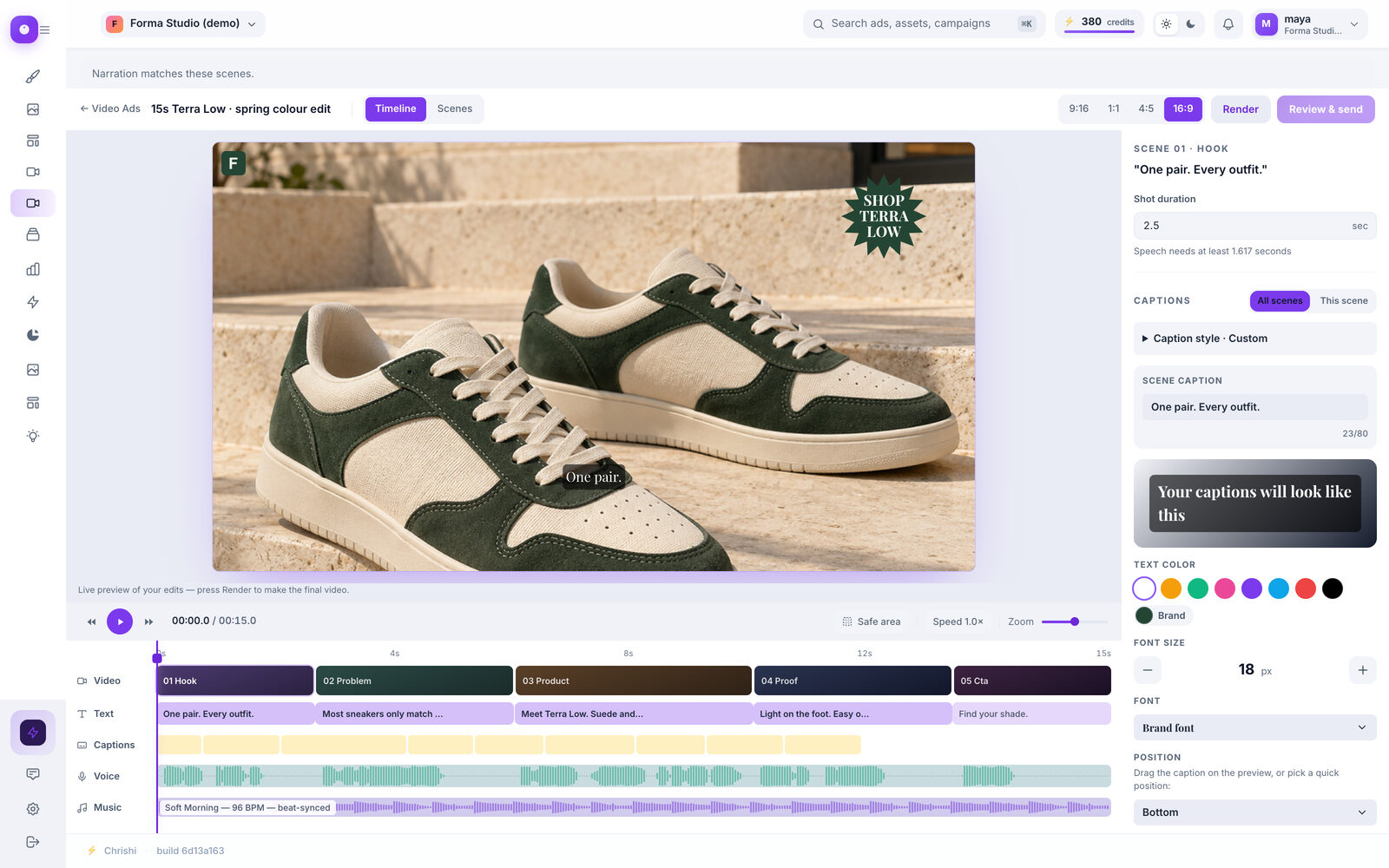
Screenshot of the Timeline Editor with a five-scene video project: a live preview and tracks for video, text, captions, voice and music
Screenshot of the current app

81 credits 3 scenes at 720p, shown before you start

The pipeline, priced

Five steps. Every price in the open.

A video is made in five steps. Each one has its price, so you know what the run costs before a paid step starts.

  1. Script

    Scene by scene, written from your product and anything the ad must say.

    Free
  2. Voiceover

    A narrated track, recorded from the script.

    5 credits
  3. Scene stills

    One picture for every scene, made for your product. A scene that uses your own product photo costs 0.

    5 credits each
  4. Motion clips

    Each still becomes a short moving clip. Choose still pictures instead and this step is skipped.

    • 540p 10
    • 720p default 20
    • 1080p 40
  5. Assembly

    Voice, pictures, captions and music are cut together into one MP4.

    1 credit

An example run

3 scenes at 720p

81credits

Voiceover
5
3 scene stills · 5 each
15
3 motion clips · 20 each
60
Assembly
1
The whole video
81

Once the script fixes the scene count, the whole run is checked against your balance before any paid step starts. If it falls short, nothing is charged for the render. Fewer scenes cost less.

Your choices up front

Decide the shape before you spend.

A few choices, all made on the setup screens before anything is generated. You see the cost before anything starts.

Scenes

Moving clips, or still pictures.

Still pictures skip the motion step, so there is no motion charge.

Format
  • 9:16 1080×1920
  • 1:1 1080×1080
  • 4:5 1080×1350
  • 16:9 1920×1080
Length

5 to 60 seconds.

Quality
  • 540p 10 credits a clip
  • 720p 20 credits a clip default for a new video
  • 1080p 40 credits a clip
Text layout
  • Product hero
  • Price drop
  • 3 benefits
  • Customer quote
  • Big statement
  • 1-2-3 steps
  • Offer badge
  • Motion graphics

Layouts are for videos made from still pictures. 4 of them need something you have saved: a price, an offer, a customer’s own words or a product photo. Chrishi never invents them.

The Timeline

A real timeline, not a black box.

Open any finished video in the Timeline Editor. Every part of the cut sits on its own row, so you change one thing without redoing the rest.

  • Video, text, captions, voice and music each get their own row
  • Press play, drag the playhead, select a scene and zoom in to check the timing
  • Set each scene’s length, and style the captions for every scene at once or for one scene
  • Show the social safe area, and set the voice and music levels
Close-up of the Timeline Editor’s tracks: Video, Text, Captions, Voice and Music rows under the play controls, with the first scenes “01 Hook” and “02 Problem”
Close-up of the Timeline Editor’s preview: a pair of green and cream sneakers on stone steps, with the caption “One pair.” and a round “Shop Terra Low” badge
Close-up of the Timeline Editor’s scene panel: the scene’s shot duration, and caption settings that apply to all scenes or to this scene
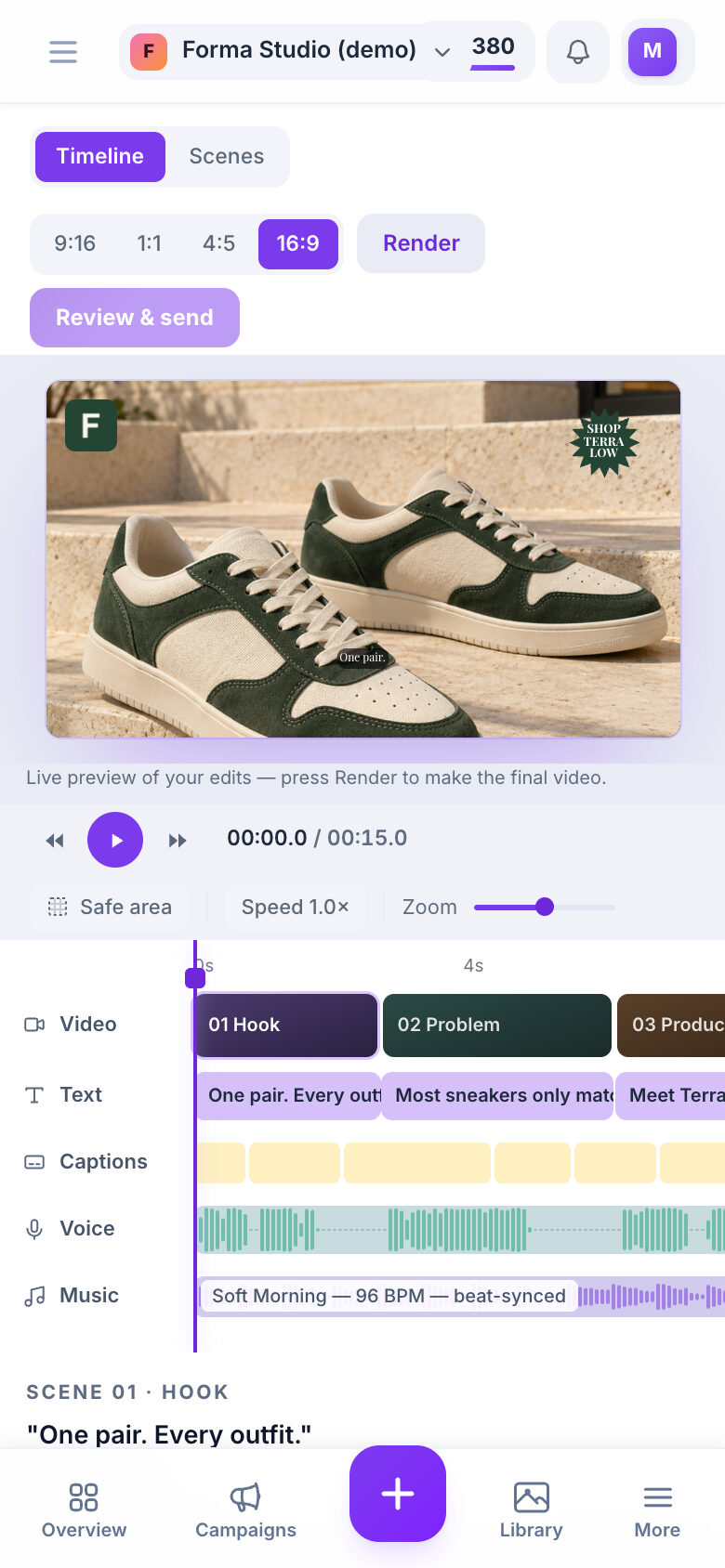
Screenshot of the Timeline Editor on a phone: the preview, the play controls and tracks for video, text, captions, voice and music

The Timeline Editor in the current app.

Export and send

Download it, or send it to Meta paused.

Download the MP4

The finished cut downloads as an MP4 at the size you chose.

  • MP4
  • 9:16 · 1:1 · 4:5 · 16:9

Send to Meta (paused)

Add a daily budget, a link and your ad text. The campaign, ad set and ad are created paused in your connected Meta ad account, and you switch them on in Ads Manager.

  • 10 credits
  • Refunded if it fails

Needs Meta connected

How a send works
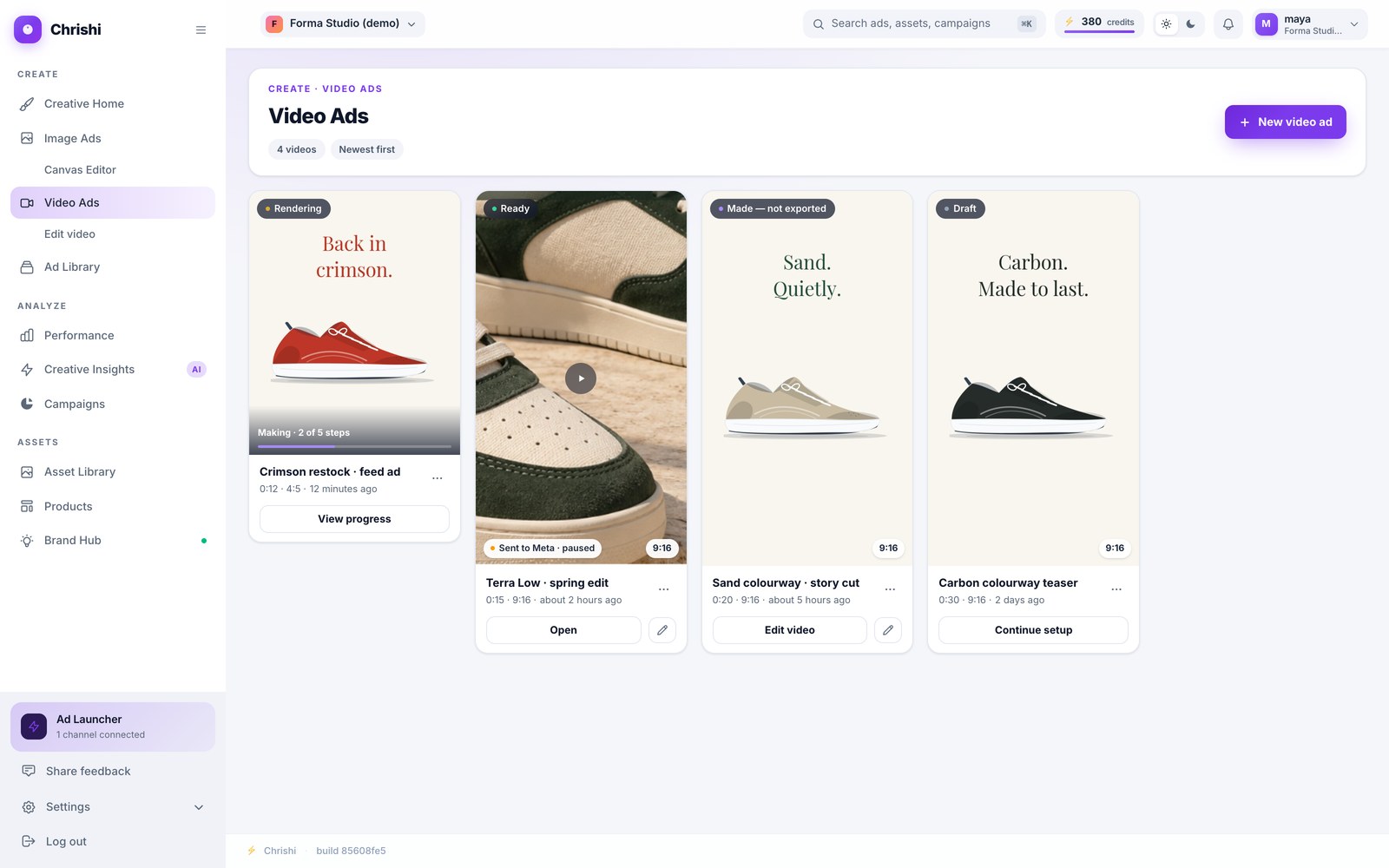
Screenshot of the Video Ads list with four videos: one rendering, one ready and marked “Sent to Meta · paused”, one made but not exported and one draft
Your Video Ads list shows where each video stands. A video sent to Meta shows “Sent to Meta · paused” until you switch it on in Ads Manager.

Start with the script. It’s free.

25 free credits cover the first steps; the cost of the whole video is shown before any paid step runs.