Guide
Your first Image Ads batch
The five choices behind every batch — format, layout, subject, message and destination — what each one changes, what a batch costs and what you can download.
Before you begin
What you need
An Image Ads batch is one brief that makes a set of ads. The brief page asks five questions; this guide goes through them in order.
- A workspace with your brand kit. The first guide shows how Chrishi builds one from your web address.
- A product photo that is clear and well lit. Clean pictures make the best ads.
- Credits: 5 an ad. A free account starts with 25.
The brief
The five choices
Open Image Ads and choose New image ad. The page asks, from top to bottom:
-
Which format?
Choose Single image for the feed, or Stories & Reels for the full-screen 9:16 format. Carousels and slideshows are made afterwards, from finished ads: tick two to ten ads in your library and choose Arrange slides.
-
Choose your layout
Pick a kind of ad (Product, Software, Service, Promotion or Brand), then a layout from the library. The layout decides where your photo, headline, price and button sit. The pictures in the picker are illustrative: your preview uses your own content and branding.
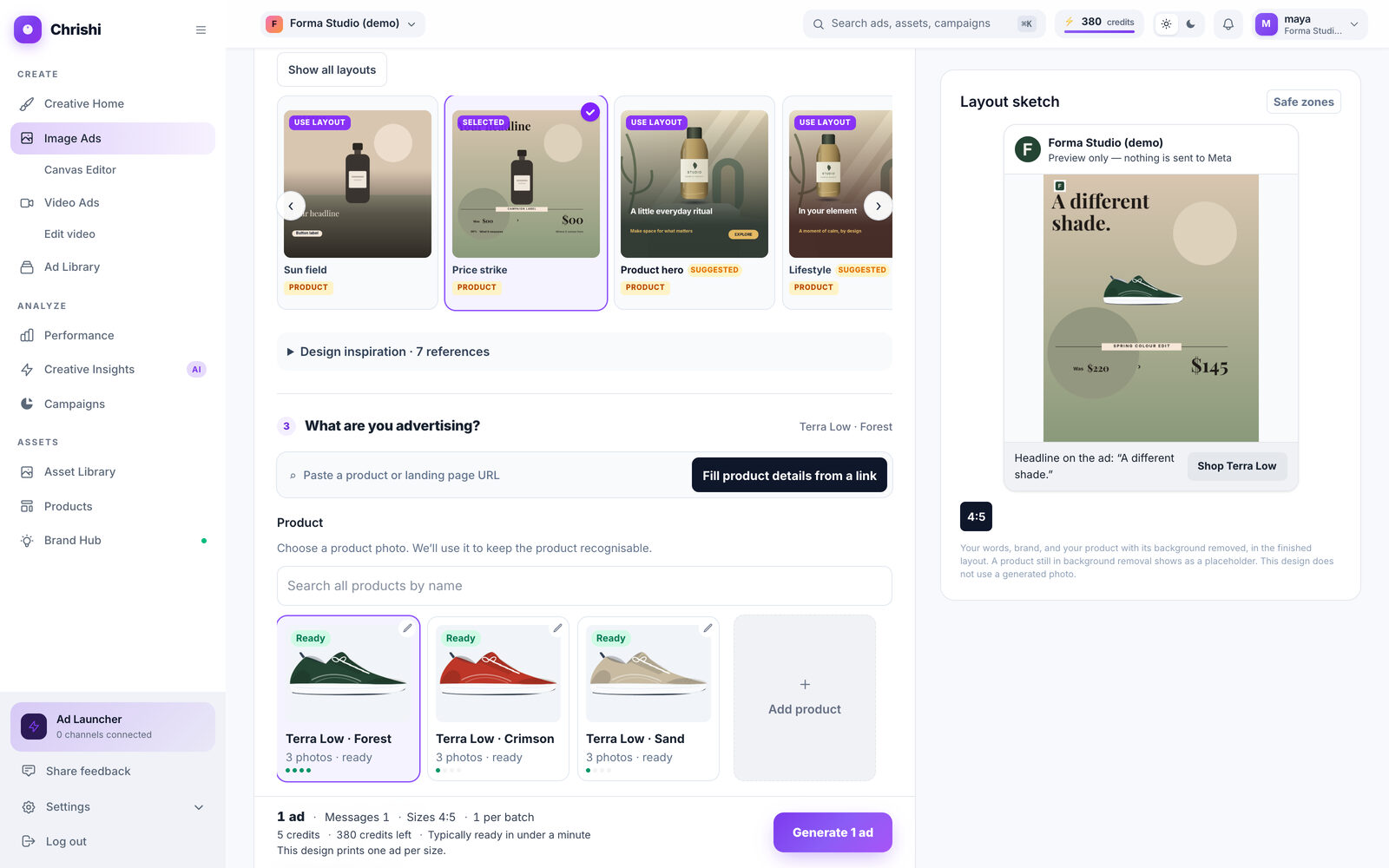
The layout picker. The selected layout carries a tick. -
What are you advertising?
Choose a product from your catalog: Chrishi uses its photo to keep the product recognisable. For software, services and brands, type a name and the facts the ad can safely use. You can also paste a product page address and press Fill product details from a link.
Screenshot of the current app -
What should it say?
Describe the ad in your own words, then set the headline, the offer, the prices and the button text. Press Suggest copy · free for suggestions: they use only the facts you gave and your approved claims, and they cost nothing. Chrishi can also write selling messages from your product’s facts, so you can pick one or compare a few.
Prices are printed only when you wrote them, and the headline is typed by Chrishi, never drawn by the AI.
-
Sizes and destination 5 credits an ad
Choose one or more sizes, say where the ad is meant to run, and add the page people should visit after seeing it. The destinations (Meta, Instagram, Google, TikTok) record which placement the ad is sized and composed for; choosing one does not send anything anywhere. The bar at the bottom shows the cost before you press Generate.
The cost, shown before you generate
Four sizes
Pick your sizes
Choose one size or several: a batch makes the ad in each. Meta’s phone interface covers the right edge and the bottom of every ad, so each size has its own keep-out strips, and Chrishi places your text inside the safe area.
| Size | Runs in | Pixels | Keep-out right | Keep-out bottom |
|---|---|---|---|---|
| 1:1 Square | Feed | 1080² | 64 px | 86 px |
| 4:5 Portrait | Feed | 1080×1350 | 96 px | 189 px |
| 9:16 Tall | Stories & Reels | 1080×1920 | 96 px | 346 px |
| 16:9 Landscape | Feed | 1920×1080 | 77 px | 108 px |
-
1:1 1080²
Right 64 px · bottom 86 px
-
4:5 1080×1350
Right 96 px · bottom 189 px
-
9:16 1080×1920
Right 96 px · bottom 346 px
-
16:9 1920×1080
Right 77 px · bottom 108 px
Striped areas are where Meta’s buttons and captions cover the ad on a phone. Layouts keep your text out of them.
While you brief, the Preview panel on the right is drawn by the same engine as your finished ad. Press Safe zones on it to see where Meta’s buttons and caption sit on each size. Choosing Stories & Reels in the first question uses only the tall 9:16 size.

One more choice
Batch or compare
Under the sizes, What would you like to create? offers three ways to run the brief.
| You want | Choose | What it makes |
|---|---|---|
| Ads in the sizes you picked | Create a batch | The ad, in each size you chose. |
| One message in different settings | Compare backgrounds | One message across up to 3 backgrounds in up to 4 sizes: Studio, Soft gradient and Natural setting. |
| Two or three messages side by side | Compare messages | Two or three selling messages across up to 3 backgrounds, in exactly one size. |
The backgrounds are instructions to the AI, not guarantees: two scenes made from the same instruction can still differ in detail.
Fidelity
What to expect from your photo
For physical products the AI paints an empty scene and your prepared product photo is placed on it as it is. Clear, well-lit product pictures make the best ads.
- Your product is placed, not repainted. The one exception is clothing shown worn on a model, which is an AI edit of your photo.
- Headline, offer, button text and price are typed by Chrishi’s layout software. The image model is told to draw no letters at all.
The numbers
What it costs
- Per generated ad
- 5 credits. Chrishi adds up the whole batch and shows the total before you generate.
- Suggested copy
- Free. You pay only to generate.
- Not enough credits
- Chrishi stops before it charges you and tells you what is missing.
- Part of a batch arrives
- The missing share is refunded.
- Nothing arrives
- Everything still outstanding is refunded.
- Download
- PNG for one ad, ZIP for several: up to 24 ads at a time, 15 MB per file and 120 MB per archive.
- Then
- Edit any ad in Canvas, or save it as a campaign draft and send it paused for 10 credits. Connect Meta and send an ad paused.
Good to know
If something goes wrong
- A price is missing from an ad
- Prices are read only when they carry a currency symbol ($, £ or €), as in “was $80, now $48”. Type them in the price fields, or write them that way in your brief.
- Only part of the batch arrives
- The missing share is refunded. Brief the missing ads again when you are ready.
- A download is refused
- Choose up to 24 ads, each under 15 MB and 120 MB in all, or download them in smaller groups.
- The product shows as a placeholder
- The sketch shows a placeholder while the product’s background is still being removed. The finished layout uses the product with its background removed.
Still stuck? Tell support what you were doing: the screen, what you expected and what happened.
Try the steps on your own store.
One free ad concept from your public pages, or start with 25 free credits.